Before you tap "place order," check the final screen for service fees and markups, replace any preset tip with an amount you choose, and compare the restaurant's own pickup or direct price. Then apply every promo code or loyalty reward you have, and save your favourite orders so the next checkout takes seconds. Those habits protect your wallet more than any other trick.
TL;DR:
- Compare one cart on the restaurant’s site and two apps, checking final totals after entering your address and payment details because fees can appear late.
- Choose pickup for small orders, where flat delivery fees consume a larger share, but weigh delivery against distance, bad weather, and the time pickup takes.
- Tips are voluntary, and 57% of Canadians consider pickup tips unnecessary; check whether suggested delivery percentages include service or delivery fees before accepting a preset.
- Check the offers tab before building your cart, and save loyalty points for larger orders, where they can cover more of the bill.
- Schedule predictable meals before peak periods, add time for busy nights or bad weather, and save tracking screenshots and chats if an order goes wrong.
Table of Contents
- 1. Practical app ordering tips you can use at checkout
- 2. How to spot hidden fees on the last checkout page
- 3. How tipping works on app orders, and your options
- 4. How to choose the right ordering app for speed, price or choice
- 5. Timing, scheduling and tracking your order
- 6. Pickup or delivery: quick rules of thumb to save money
- 7. Your last-screen checklist before you pay
- 8. Why ordering direct can save money, and when apps still make sense
- 9. A simple routine I use every time I order
- 10. Order HellCrust Pizza direct for app deals and pickup savings
- FAQ
- Sources
1. Practical app ordering tips you can use at checkout
Think of this as a short routine, not a lecture. Run through it each time and you will catch most surprises before they reach your card. The five steps below are in the order we suggest you do them, because each one feeds the next.
- Compare the subtotal with the total, then toggle pickup. Most apps show the food subtotal first and pile on charges afterward. Look at the gap between the two numbers. Then switch the order from delivery to pickup and watch what disappears. If the total drops by a few dollars, you now know exactly what convenience costs on that order. Use this step every time, especially on small orders, where flat fees take a bigger bite.
- Enter your own tip. Presets are designed to be the easy tap, not the fair amount. Look for the "custom" or "other" option and type what you think the service deserves, including zero for a pickup order you carry out yourself. If you want to reward a driver directly, cash at the door is an option on many apps. Use this step whenever the preset buttons look high.
- Apply promo codes and loyalty points before you pay. Codes are often buried in an account menu or a banner on the restaurant page, not on the cart screen. Open the offers tab first, then build your cart. If you hold points, redeem them on the larger orders, where they cover more. Check for app-only deals before checkout, since some restaurants reserve their best prices for the app.
- Save addresses, payment methods and favourite orders. A saved order cuts the odds of a wrong topping, a wrong size or a typo in your street number. It also makes repeat ordering fast enough that you can pause to compare prices instead of rushing. Save your home, work and any regular drop-off point, and label them clearly.
- Use the order notes. Short, specific instructions prevent most failed deliveries: "Blue door at the back, ring twice," "Leave on the porch, do not knock," "Buzz 304." Say whether you want contactless drop-off. Our guide to contactless delivery etiquette covers how a clear drop-off rule keeps both you and the driver out of trouble.
Pro Tip: Build your cart first, open the order summary, and only then go looking for codes. Seeing the real total makes it obvious which code is worth the hunt.
Two small habits make these steps stick. First, never order while the app is mid-update or the screen is lagging: a double tap can create a duplicate order. Second, read the confirmation email. It lists what you were actually charged, which is your evidence if anything needs correcting later.
2. How to spot hidden fees on the last checkout page
Fees are rarely hidden in the sense of being invisible. They are hidden in the sense of arriving late, after you have already chosen your food and mentally settled on a price. Retail reporting on a legal action over delivery pricing is a useful reminder that hidden service fees can show up on the very last screen, so that is where your eyes should go first.
Here is what you are likely to see:
- Delivery fee: the charge for the driver's trip, which usually varies with distance.
- Service fee: a platform charge that is separate from delivery and often calculated as a share of your subtotal.
- Small-order fee: a top-up charged when your subtotal falls below a set minimum.
- Menu markup: item prices on the app that run higher than the restaurant's own menu.
- Late-added charges: items that appear only after you choose your payment method.
Fee levels also move. Reporting on a delivery platform's decision to raise its charges notes that service fees went up and drew consumer complaints and legal scrutiny. The practical lesson is simple: the fee you paid last month is not a safe guess for this month.
For the full picture of how taxes and surcharges interact on pizza orders, see our explainer on pizza delivery fees and GST/HST. Canadian tax guidance also describes how platforms can act as carriers or payment facilitators for delivery services and may charge fees of their own, which helps explain why one order can carry several separate lines.
To test for markups, open the restaurant's own website or phone them, and compare two or three items. If the app is higher on the same item, you are paying a markup before any fee is added.

If a charge looks wrong, take a screenshot before you do anything else. Then contact the app's support through the order page, state the specific line item, and ask for a refund or correction. If the order has not yet been prepared, you can often cancel it. Pickup or ordering straight from the restaurant avoids most of this, because there is no aggregator sitting in the middle.
3. How tipping works on app orders, and your options
Tipping on apps is the part of checkout that makes people most uneasy, and Canadian research backs that up. One national survey found that 57% of Canadians believe a tip is unnecessary when they pick up their own food, a big shift from how people think about sit-down service.
94% of Canadians feel tipping has gotten out of hand, according to a 2025 summary of H&R Block research, which also reports that 9% is seen as the appropriate average gratuity. In other words, most of us want to tip, but we want to do it on our own terms.
One quirk deserves attention. Apps can base the suggested tip on more than the food. If the percentage is applied to the subtotal plus fees, the dollar amount climbs even though the "percentage" looks the same. Quebec's tipping rule has caused confusion on this point, since suggested tips are shown before tax but apps may still fold delivery and service fees into the base used to calculate them. Whatever your province, read the maths the app displays and ask what number the percentage is being applied to.
Your practical options are straightforward:
- Type a custom amount. Industry guidance notes that manual tip entry lets you override inflated suggestions, including entering zero.
- Tip in cash. If you want the driver to receive the full amount, cash at the door is a simple route.
- Choose pickup when you do not expect to tip. There is no driver to reward, so the question mostly disappears.
- Remember that tips are voluntary. At least one delivery platform's terms state that tips are voluntary and suggestions can be changed.
A tip is a thank-you for real service. Set it on purpose, not by reflex.
4. How to choose the right ordering app for speed, price or choice
No single app wins on everything. The useful question is what you care about tonight, because that decides which app earns your order.
Weigh these axes:
- Fees and markups: the difference between menu price and what you finally pay.
- Delivery speed: estimated times, and how accurate they proved last time.
- Selection: how many restaurants near you actually deliver.
- Rewards: points, free-delivery passes and member prices.
- Customization: how well the app handles toppings, substitutions and special requests.
The fastest way to settle the question is a side-by-side test. Build the same order in two apps and on the restaurant's own site, stop at the final screen in each, and compare the totals. It takes only a short time and can expose a gap larger than any promo code could close.
Then match the result to your priority:
- Cheapest: pick the restaurant's own channel, or choose pickup in whichever app is lowest. A diner survey notes that many people still order by phone or direct channels and that restaurants are encouraged to promote direct online ordering to help diners avoid high delivery fees.
- Fastest: accept a platform fee when you are hungry, short on time or dealing with bad weather, but only after checking whether the faster option really arrives sooner.
- Most choice: a large aggregator makes sense when you want variety across many kitchens, and the fee is the price of that variety.
Some direct-order apps skip the markup entirely. One restaurant-focused platform describes a model showing menu pricing with no added service fees alongside a loyalty points programme, which shows what direct ordering can look like when no aggregator is involved.
5. Timing, scheduling and tracking your order
A late or missed delivery usually comes from a small decision made earlier: ordering at the busiest moment, leaving no buffer, or giving a vague address. A few habits fix most of it.
- Schedule ahead for predictable mealtimes. If you know dinner is at 6:30 on a Friday, schedule the order instead of fighting for a driver at peak time. Our piece on what really controls arrival time explains how scheduling works and where the limits are.
- Add a buffer on busy nights and in bad weather. Estimates are exactly that. If guests are coming or you have a hard deadline, order earlier than you think you need to.
- Watch live tracking. It tells you when to put your shoes on and when to unlock the building door. See how to follow your order now if you are unsure where to look in the app.
- Message the driver clearly. If a driver is circling, a short note or text with the entrance, buzzer code or landmark usually solves it.
- Document problems. If the order never arrives or is badly wrong, screenshot the tracking screen and the chat, then request a refund through the app. Dated evidence makes the conversation quick.
Missed deliveries are the most frustrating and the easiest to prevent, because the fix is almost always better information given up front.
6. Pickup or delivery: quick rules of thumb to save money
Pickup is often the cheapest way to eat, but it is not always the smartest. These rules help you decide in a few seconds.
- Default to pickup for small orders. A flat delivery or small-order fee takes a larger share of a small bill, so carrying it out keeps more of your money.
- Compare the restaurant's own pickup price with the app's delivery price. The same pizza can carry a different price depending on the channel. Check both before you confirm.
- Choose delivery when distance, weather or time make pickup impractical. A short trip in good weather is cheap. A long drive in a storm costs fuel, time and patience, and a delivery fee may be the better deal.
- Use pickup for family and bulk orders. Larger orders magnify percentage-based fees and tips, so picking up gives you the biggest savings where the bill is highest. For a worked comparison, see our guide on saving money with pickup or delivery pizza for families.
If you are feeding a crowd, group size changes the maths further. A practical guide on choosing a catering format shows how larger gatherings are often better served by planned pickup than by several separate delivery orders.
7. Your last-screen checklist before you pay
Keep this checklist in mind. It takes only a moment.
- Confirm every item, size and modifier, including crust and toppings.
- Verify the delivery address, unit number and drop-off notes.
- Scan the itemised fees and taxes, and compare the total to your subtotal.
- Set the tip to a custom amount if the presets feel too high.
- Apply promo codes or redeem loyalty points.
- Check the payment method and the estimated arrival or pickup time.
If anything surprises you, stop and fix it now. Changing an order before payment is simple. Changing it afterward usually means a support chat.
8. Why ordering direct can save money, and when apps still make sense
Direct ordering tends to win on price for a plain reason: no third party takes a cut. When a restaurant takes your order through its own site or app, the extra service fee and any menu markup from an aggregator can disappear. Restaurant technology providers say the same thing, noting that independent restaurants often use direct ordering tools that let customers pay the exact menu price.
Apps still earn their place:
- Broader choice across many restaurants in one screen.
- Occasional exclusive promotions that offset the fees.
- Fast fulfilment when a driver network is nearby.
- One saved payment method for everything.
Our own app is an example of the direct-order benefit. We offer app-exclusive deals when you order through our app. When you know what you want and where you want it from, direct ordering is usually the shortest path to the lowest total.
9. A simple routine I use every time I order
Here is the routine I come back to, and why it works for me. Before I order anywhere, I open the restaurant's own app and a favourite aggregator, build the same cart in both, and compare the final totals. I pick pickup for any small order, because the savings are almost always larger than the convenience I would lose. I never accept the preset tip: I type a custom amount, and it is rarely the highest button.
One non-obvious trick: I check the order summary after the app has had a minute to refresh. Some apps recalculate fees only after you confirm your address or payment method, so the first total you see is not always the real one. Waiting for that second number has saved me from several unwelcome surprises.
— jaskirat Singh
10. Order HellCrust Pizza direct for app deals and pickup savings
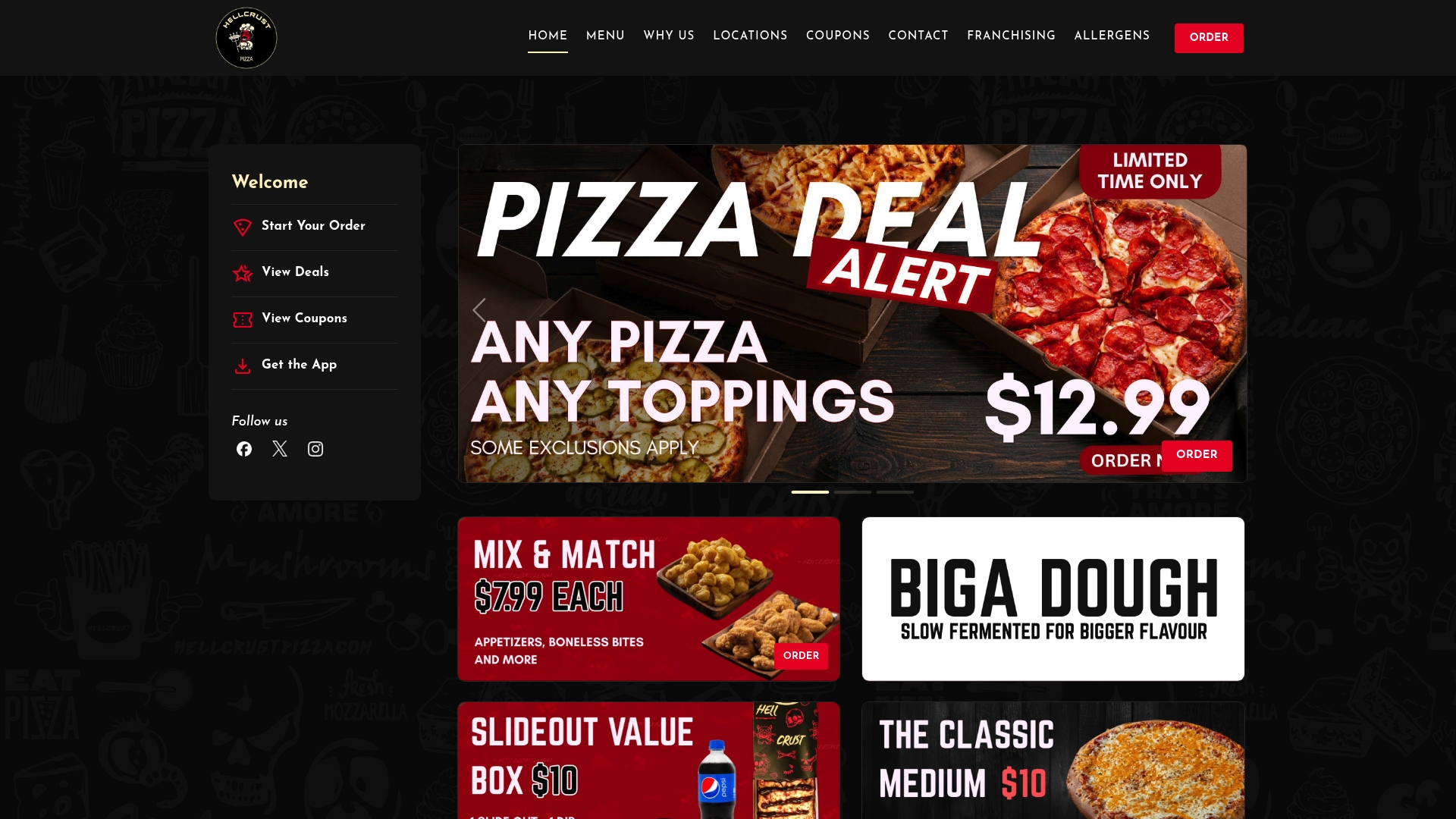
You have the checklist, so here is a place to use it. At HellCrust Pizza we make pizza on a Biga multigrain, artificial additive-free dough that we prepare in advance, which gives the crust a rich flavour and a lighter, more digestible bite. When you order through our app or straight from us, you can access deals we offer to people who order direct.
Here is what you will find:
- App-exclusive deals you will not see on aggregator listings.
- Create-your-own pizzas with fresh ingredients and customizable toppings.
- Mix and Match options and family-sized specials built for sharing.
- Vegan pizzas, pastas, sides, desserts and dips to round out the order.
- Pickup, since carrying it out skips the delivery step entirely.
Run our menu through the checklist above. Compare the total, set your own tip, and see whether pickup suits tonight. When you are ready, browse the HellCrust Pizza menu, build your order, and check the app for the offers running right now.
FAQ
Do you tip on mobile orders?
It depends on the service. For pickup, many people skip it, since a national survey found that most Canadians feel a tip is unnecessary when they collect their own food. For delivery, a tip is a thank-you for the driver and is up to you.
What is the best app to order from?
There is no single best app, because the right one depends on your priority. Compare the final total for the same order in two apps and on the restaurant's own site, then choose based on price, speed or selection. Ordering direct often gives the lowest total.
How much do you tip on a $50 delivery?
There is no fixed rule, and tips are voluntary. A custom amount that reflects the service you received is a reasonable approach. According to H&R Block's summary, 9% is often seen as an appropriate average gratuity. Check what amount the app is applying its percentage to.
Am I supposed to tip when ordering online?
Not automatically. Tip prompts are suggestions, and you can change them to a custom amount or zero. If you want the driver to get the full amount, cash at the door is another option.